Dumb Anchors

My new life goal is to not get featured on this blog.

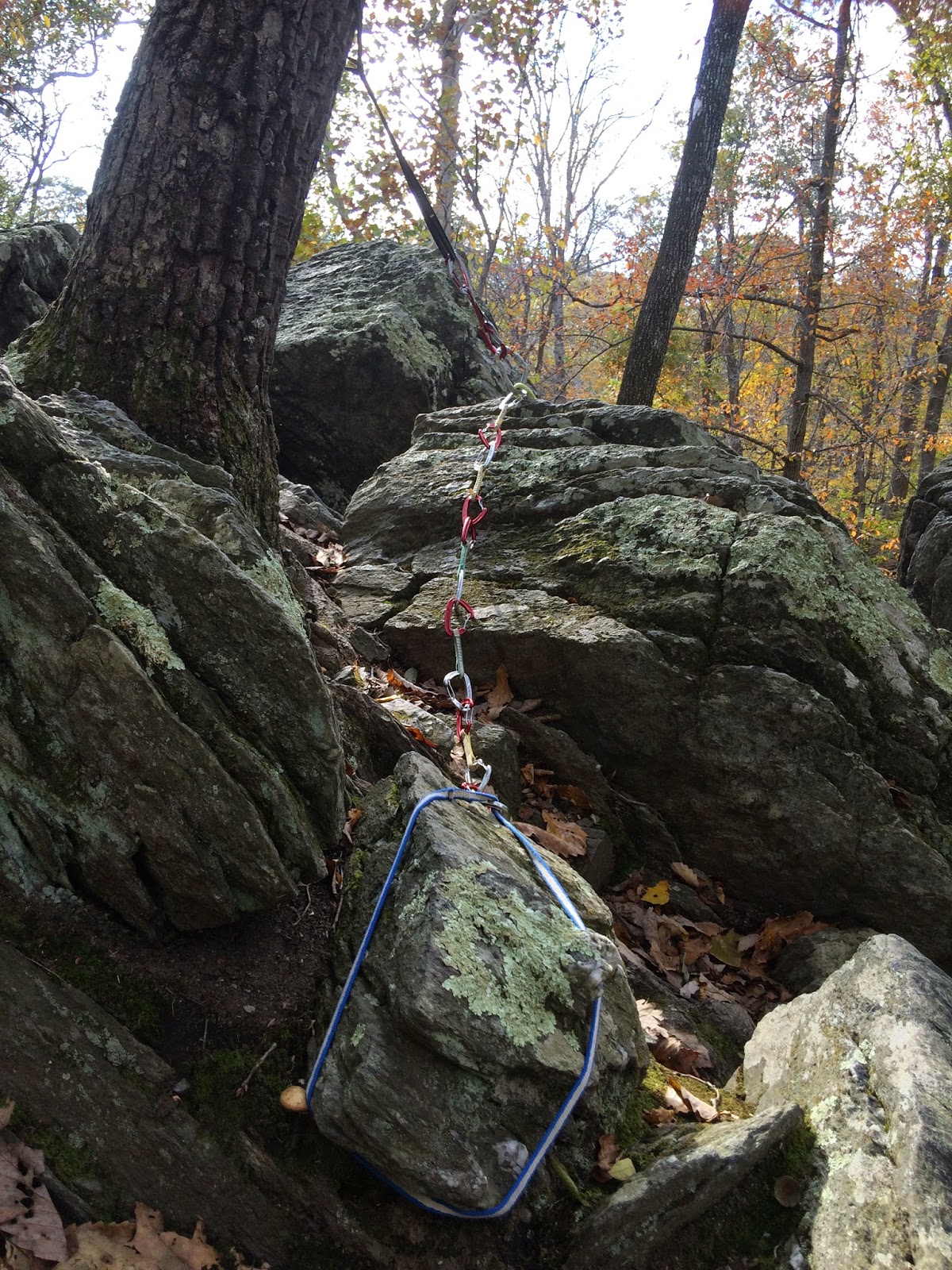
Taken from “Today’s nominees for the Worst Toprope Anchor Ever,” posted Oct 25, 2014 on dumbanchors.blogspot.com. Photo: John Gregory

Hat tip to John Gregory, the “Mayor of Carderock,” for showing us what not to do through photos on his DumbAnchors blog.

My new life goal is to not get featured on this blog.

People who climb at Carderock and Great Falls know that the locals expect that top ropes will be set using static rope tied with bowline hitches to two natural anchors. These can be either trees or preferably, boulders, to reduce wear on the remaining trees. This is a variant of the classic “Joshua tree” setup and is optimal in both safety and materials efficiency.

Gear Checklist for Multipitch Followers

for Seneca Rocks, West Virginia

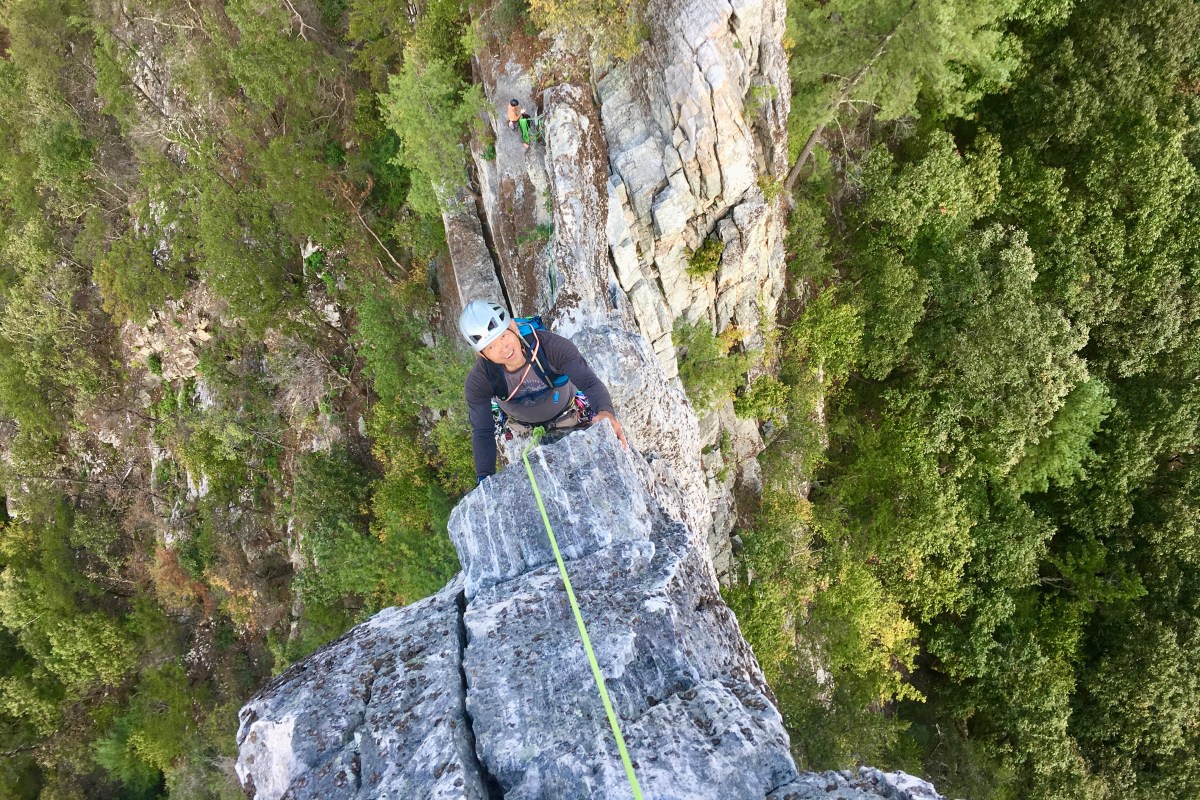
Richard Lin on Gunsight to South Peak Direct (5.5) at Seneca Rocks, West Virginia

Critical Gear

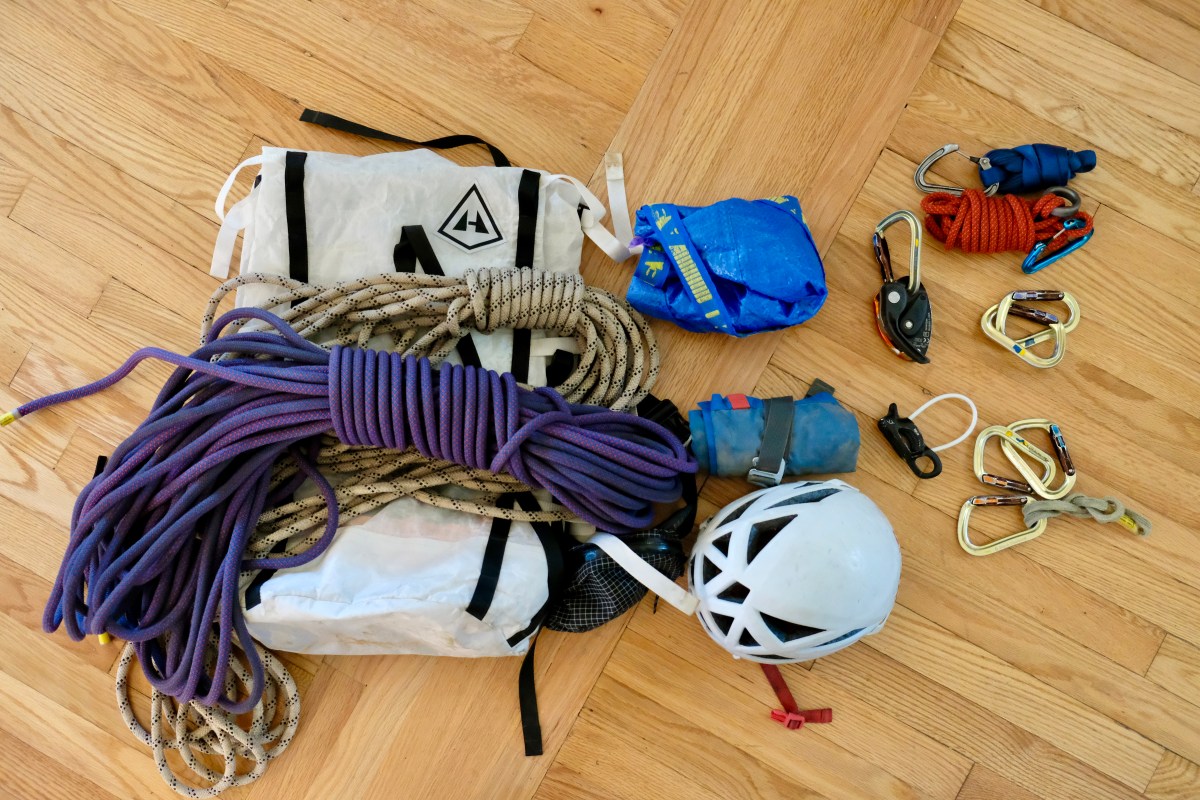
If we’re climbing together, I have two follower’s kits with these six items. You can use one of my kits, or use your own gear.

  1. Petzl GriGri and locking carabiner. The GriGri is the gold standard for assisted braking belay devices and is useful for rescues.
  2. Four additional locking carabiners.
    Recommended: Any lightweight offset-D type carabiner (the most common kind). See current reviews on locking carabiners.
  3. ATC (tube type) belay device: For rappelling.
    Recommended: Black Diamond ATC-Guide, which can be used for rescue and other purposes.
  4. Full-length (120 cm) nylon runner or a personal anchor system (PAS).
    Any brand of nylon runner in 120 cm will work well. Recommended, if you climb frequently: Petzl Connect Adjust lanyard. Its easy adjustability helps on rappel ledges.
  5. Prusik loop. Used to create an autoblock for rappels.
    Recommended: Sterling 13.5” HollowBlock2. It’s grippy and easy to use.
  6. Nut tool. Used for retrieving nuts and walked cams.
    Recommended: Wild Country nut tool.

Required Gear

You’ll need to bring. If we’re climbing together, I may have extras for some of these.

  1. Harness: Any new, all-purpose climbing harness with gear loops.
    I have no recommendation. Most modern harnesses are about the same, and not much separates the most expensive harness from the cheapest. See current reviews for women’s harnesses and men’s harnesses.
  2. Climbing helmet. Helmets protect against falling rock and dropped gear from climbers above, and can sometimes help with leader falls.
    Recommended: Any climbing helmet. More expensive helmets are lighter and have better venting. See current reviews on climbing helmets.
  3. All-day climbing shoes: Comfortable, flat-soled, “trad” climbing shoes, that you can wear all day. You will generally not be able to take off your shoes while doing multipitch. Most climbing shoes sold today are “aggressive” and marketed for indoor gym climbers. They are too uncomfortable to wear all day.
    Recommended: La Sportiva Mythos ($$), La Sportiva Tarantulace ($), or Scarpa Helix ($). La Sportiva shoes run narrow, so if you’re a woman with wide feet, try the men’s version. If you’re a man with wide feet, check out the Scarpa Helix.
  4. Small (12-18 liter) backpack. While any small pack will work, climbing packs include a helpful clip on top for securing the rope.
    Recommended: REI Flash 18 ($). This ultra-lightweight backpack comes in handy for so many things, not just climbing.
  5. ⚠️ Headlamp. This may seem optional, but it’s critical. Especially in the fall, the sun drops down the horizon suddenly and the last part of a descent is often (usually!) done in pitch black. As a side note, whenever I’m outdoors, I always bring a headlamp for emergencies, and I use my headlamp all the time.
    Recommended: Petzl Actik Core ($$). This headlamp is all-around amazing. The Petzl headlamps are easy to operate; the Black Diamond headlamps require an engineering degree just to turn them on. The Core is a removable, rechargeable battery. You want rechargeable, so that you can top off your battery before every trip. And you can buy a second Core battery as a backup.
  6. 2-3 liters of water. It’s often sweltering at Seneca.You’ll go through a lot of water. You can use a hydration bladder or a water bottle. Each has its pros and cons. If you bring a water bottle, you will only be able to drink when we are sitting on a good-sized ledge.
    See current reviews of hydration bladders. More recently, I have been using a 36-oz insulated Yeti bottle, which keeps my water ice-cold. But, it is heavy.

Other Recommended Gear

You’ll survive without these, but they’ll make your experience better.

  1. Light tech shell, light rain jacket, or poncho. West Virginia is subtropical rain forest. Yes, really. The world record for the fastest one-minute rainfall is held in nearby Unionville, Maryland: 1.23 inches of rain in one minute, causing a building to collapse. It often rains more than once a day throughout the summer at Seneca. The best way to deal with rain there is by just ignoring it or by taking a short break. Fall weather is drier, making it prime climbing season.
  2. Approach shoes. These are hiking shoes/boots lined with sticky climbing rubber for scrambling. They are safer and work better than sneakers.
    Recommended: I use La Sportiva TX4. See current reviews of women’s approach shoes and men’s approach shoes. La Sportiva shoes run narrow, so if you’re a woman with wider feet, try the men’s version.
  3. Swimsuit, towel, and change of clothes. There’s a great swimming hole an eighth of a mile down the river. It’s one of West Virginia’s most beautiful spots.

Gear for Outdoor Climbing at Carderock or Great Falls

When I started climbing outdoors, I’d just finished Earth Treks’ Top Rope Systems I course. I was excited and wanted to start climbing outdoors right away. I didn’t know what to buy, so I just put together what I thought made sense.

Now I know. This is stuff I wish I’d known when I started out.

This list is mostly specific to Carderock, Maryland and Great Falls, Virginia, where locals expect you to set your top-rope anchors specifically using burly static line tied in bowline hitches around trees and large boulders. (You’ll get heckled if you do it any other way).

1. Rope

REI has a nice article about the different kinds of climbing rope.

I started with an all-around single climbing rope. These ropes are good for any kind of climbing, but they stretch a lot – sometimes too much for top-roping.

I really like semi-static ropes for top-roping. They stretch just enough to soften a top-rope fall. They’re usually marketed as gym ropes for top-roping.

If I wanted one rope that does everything, I’d get an all-around climbing rope. But I top-rope often enough that I also bought a burly, semi-static rope. I have the Sterling ReVo in 40 meters, which is a great length for Carderock and Great Falls.

See current reviews on climbing ropes.

2. A Static Rope for Tying Anchors

Any burly (10+ mm) static rope will do.  I use 120 feet (40 meters) of static rope for Carderock/Great Falls.

REI sells static rope by the foot.

Don’t buy rope at the hardware store! It is not designed for mountaineering and is much weaker than UIAA-rated static rope.

3. Three or Four More Locking Carabiners

I needed 2 carabiners for my climbing rope to slide through my top-rope anchor, and another carabiner to secure myself with a prussik while setting the top anchors. I loved the Black Diamond Magnetron Vaporlocks, but they are now out of production.

See current reviews on locking carabiners.

4. An Autoblock Cord

Falling from the top while setting anchors is a common cause of death while top-roping. This issue is personal for me. A friend of mine, Reid Judson Hunt, died looking over the lip before an ice climb. While finishing up your top-rope anchor, make sure you’re tied into the anchor with your GriGri or an autoblock cord.

Any 6-7 mm cordelette tied into a loop will work, but I really love the pre-sewn Sterling hollow block loops. They just work better and are smoother to use than cordelette.

5. A Belay Device with Assisted Braking

It’s a little harder to stop falls outdoors than it is in the gym. You’ll be using a skinnier and probably a dry-coated rope that will want to slide through your ATC. Also, at Movement and other gyms, the rope usually wraps around the pulley at the top anchor twice, creating extra drag. You won’t have that outdoors.

You will want a belay device with teeth or assisted braking. The Petzl GriGri is the current gold standard for assisted braking devices. In a top-rope situation, it’s almost foolproof. It automatically locks when the climber falls.

6. A Big Backpack To Carry Everything

You will be carrying all of this, plus your shoes, your harness, at least a liter of water, and your lunch. Most people prefer to carry ropes inside of their bag rather than on top of it, if they can (but if their bag gets full, they secure the ropes on top). This is a lot of gear, and a 15 or 20 liter backpack is not going to work. You will want a 30-40 liter crag pack.

A crag pack is different from a regular hiking backpack in that it is designed to be worn while climbing. Most crags involve some scrambling to access them. Crag packs are narrower than hiking backpacks and usually open only at the top. They usually have a strap on top for securing the rope.

7. Other things

I assume that you already own shoes, a harness, and a carabiner for belaying. See my post on buying gear for climbing indoors.

You probably want a helmet. People don’t use helmets at Great Falls and Carderock because there’s not much loose rock that could fall on climbers below, but if you move out to other crags, a helmet is a must.

I think you’d really like approach shoes, if you are willing to spend the money. These are sneakers or hiking boots with rock climbing rubber soles, so they make it easy to scramble around the crag without worrying so much about slipping. People say you can climb 5.9 in them. I’m not that awesome but you can definitely climb 5.easy.

You might want a rope tarp to keep your rope a little cleaner. Another good option is just one of those IKEA blue bags, which can be bought from Amazon. I think this is cheaper and more useful than a dedicated rope bag.

8. What Not to Buy

Slings, runners, and tubular webbing come in handy for other things, but you generally don’t need them for Carderock or Great Falls. Tubular webbing is not as strong or abrasion-resistant as static rope.

Trad protection devices like cams/SCLDs are occasionally helpful for setting up a redirect. The Aid Box area at Great Falls is also most easily set up using cams/SCLDs.

You don’t need a rope bag, as I mentioned. A tarp, or a blue IKEA bag, is cheaper and packs down smaller.

Summary: Gear Checklist

  1. Harness
  2. At least three locking carabiners
  3. Belay device
    Recommended: Petzl GriGri
  4. Climbing Shoes. Flat-soled shoes are the most comfortable.
    Recommended: La Sportiva Mythos, La Sportiva Tartantulance, or Scarpa Helix.
  5. 40 meter climbing rope. See above.
  6. 40 meters (120 feet) of burly (10+ mm) static rope.
  7. Large crag backpack (30-45 liters).
  8. Water bottle.
  9. Climbing helmet. (optional at Carderock and Great Falls).
  10. Approach Shoes (optional).
  11. Rope tarp or blue IKEA bag (optional)

Installing a MySQL server on macOS 10.10 Yosemite or 10.11 El Capitan, with or without Server

Apple phased out MySQL in favor of PostgreSQL.  There are valid reasons why we might prefer MySQL, such as compatibility with legacy code.

Here are my instructions on how to install MySQL as a permanent service on macOS. These instructions work with or without macOS Server installed. For the most part, installation is straightforward, but read this carefully because there are big gotchas where it comes to file permissions.

I’ve tested these instructions several times on macOS 10.11 El Capitan and 10.10 Yosemite. I think these instructions will probably work on 10.8 Mountain Lion and 10.9 Mavericks.

Backup your MySQL databases.

You want to back up your MySQL databases before doing a macOS upgrade. The easiest way is to create a mysqldump file. Databases can also be restored from data files, but this is harder.

$ mysqldump -uroot --all-databases > ~/Desktop/dump_all.sql

Install or upgrade macOS.

Download Xcode from the App store and install the command line tools.

Xcode is a dependency for Homebrew, which uses Xcode’s gcc compiler to compile everything from source. Once you have Xcode installed, you need to install the command line tools for the gcc compiler to work. From Terminal:

$ xcode-select --install

Check the systemwide PATH variable.

Open a Terminal window:

$ cat /etc/paths

Make sure that /usr/local/bin occurs before /usr/binIf they don’t, then you need to change this order. Edit /etc/paths using vi or your favorite text editor. I love and use TextWrangler. Close your Terminal window and open a new Terminal window for this change to take effect.

Obtain Homebrew. 

Homebrew is a great package manager for macOS that installs everything in /usr/local/bin and does not require sudo.It then symlinks to the expected locations so that the packages can find one another. Because the packages are centralized in the Cellar, they are easily updated and removed.

$ ruby -e "$(curl -fsSL https://raw.githubusercontent.com/Homebrew/install/master/install)"

Fix any problems that Homebrew detects.

$ brew update
$ brew doctor

Follow brew doctor‘s instructions. brew doctor usually complains about Xcode. If I’m guessing the error correctly, here is the solution that brew doctor will suggest (assuming macOS 10.10 – note the version since this affects what you will type into Terminal):

$ cd /Applications/Xcode.app/Contents/Developer/Toolchains/
$ sudo ln -s XcodeDefault.xctoolchain OSX10.10.xctoolchain
# note the version (10.10) and modify accordingly.

Run brew doctor again. Continue to follow brew doctor‘s instructions until it tells you that “Your system is ready to brew.”

Install MySQL.

$ brew install mysql
# ignore homebrew's instructions to symlink the .plist file!

Homebrew has just installed MySQL to run under the current user, which is not what we want for our server, but we will get to that in a moment. First, we will test the mysqld service to see if it launches. In newer versions of MySQL, the command to launch the service is $ mysql.server start.

$ mysql.server start
$ mysql.server stop 

Modify the .plist file to improve logging.

Using vi or your favorite text editor, modify the .plist file.

$ vi /usr/local/opt/mysql/homebrew.mxcl.mysql.plist
# use vi or your editor of choice 

Add these lines within the <dict> block:

<key>StandardErrorPath</key>
<string>/var/log/homebrew.mxcl.mysql.err</string>
<key>StandardOutPath</key>
<string>/var/log/homebrew.mxcl.mysql.log</string>

Set up the MySQL service to launch at boot time as part of a server.

Homebrew’s instructions, which I asked you to ignore, would have installed a LaunchAgent for your current user account, so that the mysqld service would start whenever you logged in. This would work great for a personal development machine, but it’s not not ideal for a server.

For a server, what we want is for mysqld to start up at boot time by the root account. So, we need to make two changes:

  1. The .plist must link into /Library/LaunchDaemons and have the appropriate permissions to be launched by root.
  2. The mysql database files in /usr/local/var/mysql must all be owned by user _mysql. You might wonder why the owner must be _mysql, since the server starts up as root. This is because whenever mysqld detects that it is being run as root, the process steps down to user _mysql as a security measure. This is typical behavior for services. The Apache service, for example, starts up as root at boot time but steps down to user _www.

Open a Terminal window, and enter:

$ sudo ln -sfv /usr/local/opt/mysql/*.plist /Library/LaunchDaemons
$ sudo chown root:wheel /usr/local/opt/mysql/*.plist
$ sudo chmod 600 /usr/local/opt/mysql/*.plist
$ sudo chown -R _mysql:wheel /usr/local/var/mysql

Important: Now that mysql belongs to root, do not run the $ mysql.server command again as a regular user! Don’t do it. This will result in an aborted launch with permissions errors. You will need to delete the resulting .pid files in /usr/local/var/mysql before mysqld will be able to run again, even as root. Again, don’t do it.

Verify that the MySQL service starts up at boot time.

We will reboot the server machine. At boot time, launchctl should load our modified .plist and run mysqld. We will then run the mysql command from Terminal to interface with the mysqld service and verify that it’s running.

 $ sudo shutdown -r now

After the machine restarts, re-enter Terminal and type:

 $ mysql -uroot 

If the mysql command fails, then we know that either the LaunchDaemon didn’t kick in, or that mysqld failed to start successfully. Again, if this happens it is usually because of a permissions issue. To troubleshoot, check the log files at:

/var/log/homebrew.mxcl.mysql.out
/var/log/homebrew.mxcl.mysql.err
/usr/local/var/mysql/*.err

Restore your MySQL databases.

$ mysql -uroot < mydumpfile.sql
$ mysql_upgrade

A full dump from a recent version of MySQL should successfully restore all databases plus the privilege table, which controls users. If there are problems with the privilege table after restoring, then edit out the privilege table from your mysql dump file, and re-create your users manually using a tool like phpmyadmin.

I hope this post helped someone. Happy monkeying!

Gear for Indoor Climbing

This is based on my experience and what I learned from climbing friends and the community.

I’d been fascinated with climbing for a long time. In college, I took a rock climbing class with my best friend. We were determined to get into the sport, but we were too broke to buy gear and we didn’t have a car. Before we knew it, college days were over and we were focused on starting our careers.

Fast-forward to having just turned 40. My body had been converting itself into fat. I wasn’t overweight, but I no longer felt fit. My lifelong passion, skiing and snowboarding, didn’t keep me physically active year-round, and in Maryland the season was getting a little shorter every year because of obvious global warming. My then-wife and I talked about rebalancing our lives, like we rebalanced our spending every year. We decided to put more time into taking care of ourselves and less time into working overtime, which had been our habit for many years.

In retrospect, this was the beginning of a long push for a better work-life balance.

I took the kids to the local rock climbing gym, Earth Treks (now Movement) in Rockville, Maryland. At the time, Earth Treks Rockville was the largest climbing gym in the United States. The kids were instantly hooked, and so was I. A few weeks later I convinced my then-wife to try it. Although she resisted at first, she was also hooked. This investment into my physical well-being was one of the best decisions I’ve ever made.

Soon, we started buying our own gear. I scoured product reviews on Outside, Amazon, REI, Backcountry, Moosejaw, evo, and later, OutdoorGearLab, after its launch. (Of these, OutdoorGearLab does the best job of reviewing products. They have a consistent methodology, and they don’t get manufacturer kickbacks).

Climbing Harness

Harnesses cost about $50. As an aside, in college we learned how to tie old-school harnesses using tubular webbing, called a swami belt. Someday I’ll show up at the gym wearing a swami belt.

I started out with an entry-level all-purpose harness, and when that got old, I replaced it with a high end harness, and barely noticed any difference. I’ve now gone through several harnesses at various price points, and have barely noticed differences between them.

Buy any padded, all-purpose harness that feels comfortable. All-purpose harnesses are great for top-roping and sport climbing, both indoors and outdoors. (There are some specialized harnesses for specific applications, such as ultralight ones for alpine climbing, and larger/heavier harnesses with additional gear loops for multipitch climbing). You can also check OutdoorGearLab’s current reviews for women’s harnesses and men’s harnesses.

IMG_1892
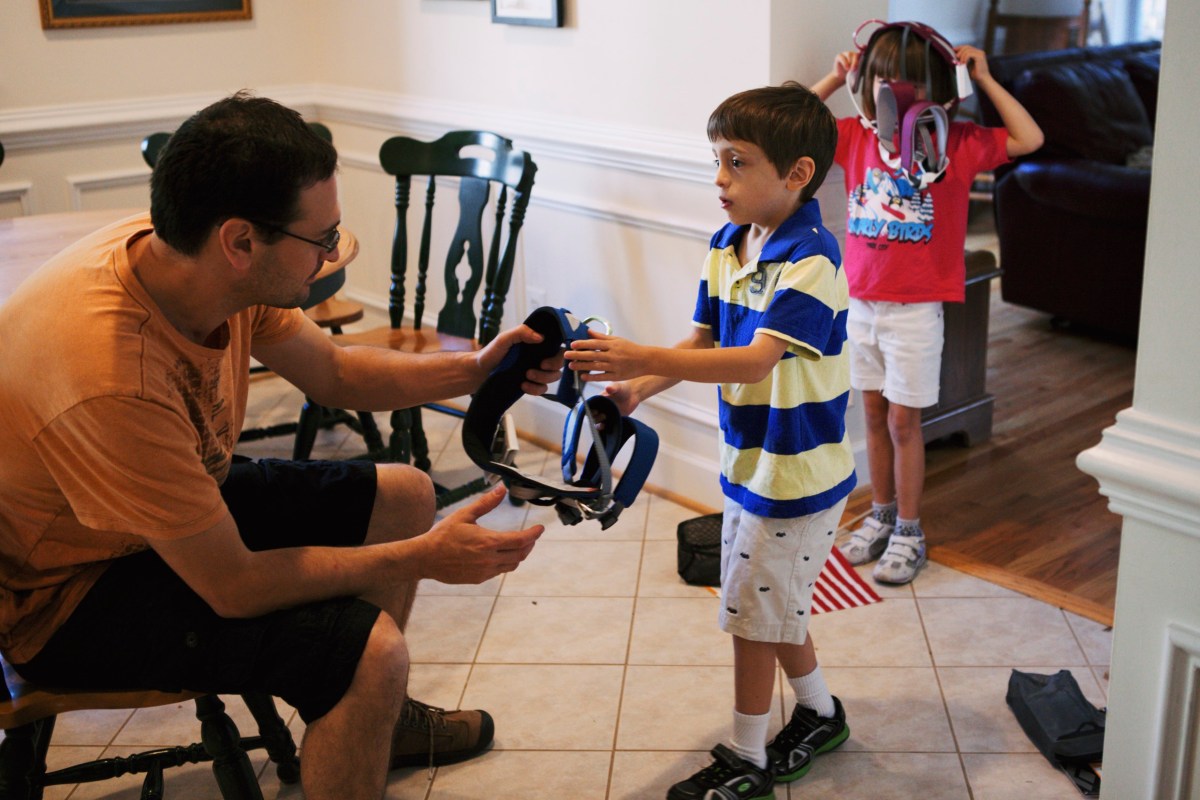
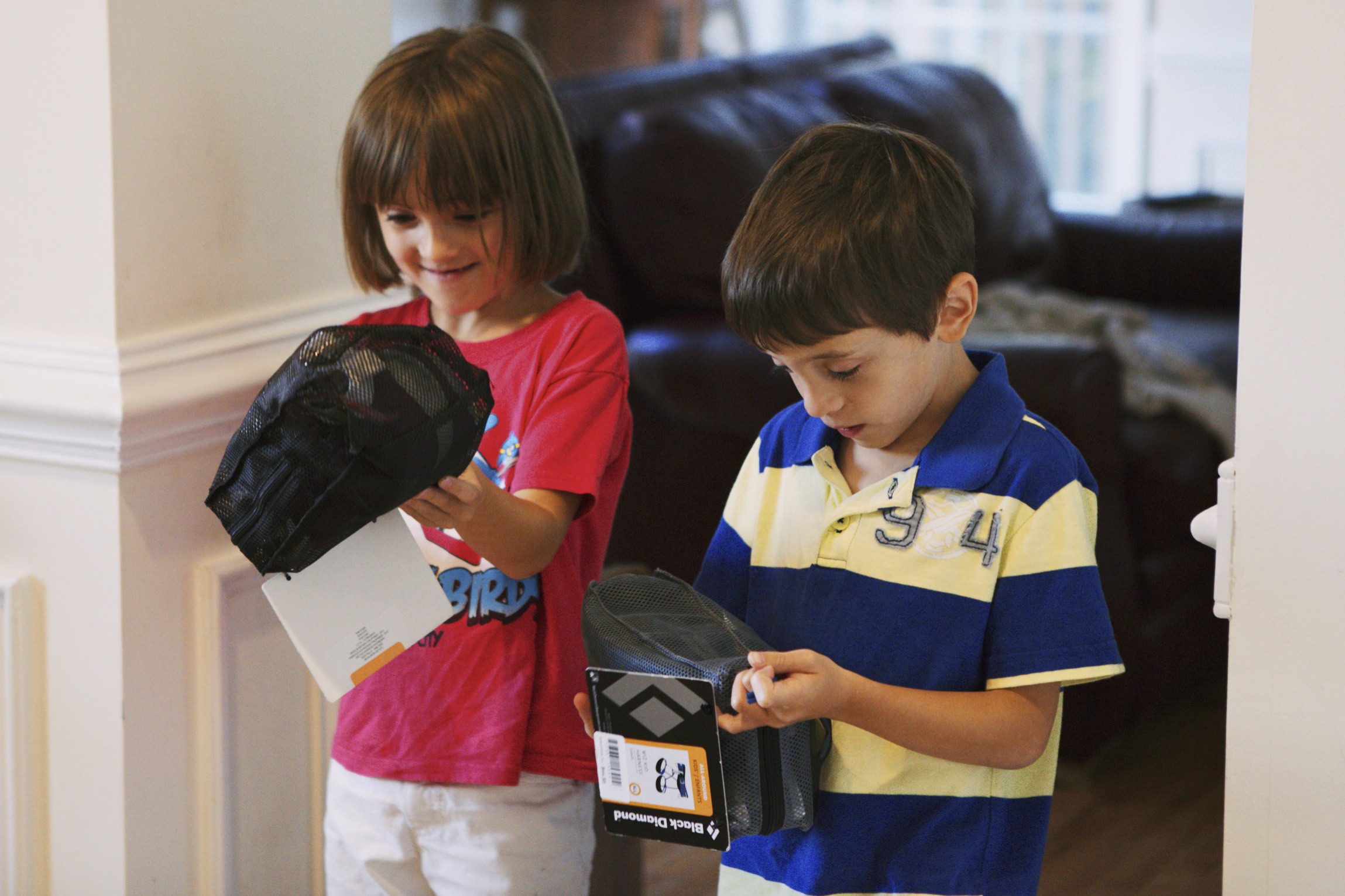
The kids getting their first harnesses. Making them smile like this is priceless. 6 Oct 2012

No matter what, you will need to replace your harness every 4-5 years, since the nylon eventually breaks down. Nylon breaks down faster if you let it get dirty, or if you leave it outside in the sun. Also, don’t store your harness or other climbing gear anywhere near a car battery, gasoline, paint thinner, other solvents, acids, or bleach, since the vapors from any of these will weaken nylon. There have been rare reports of harnesses disintegrating under body-weight load after being unknowingly exposed to a strong acid, probably sulfuric acid from a nearby car battery.

Climbing Shoes

I recommend getting comfortable shoes. This means an unlined leather “trad” shoe with flat soles. I’ve messed around with shoes, and the pain of aggressive shoes isn’t worth it. Aggressive shoes can hurt so much that they can turn people off from the sport, especially kids. I see climbers sending 5.12 in comfortable, non-aggressive shoes.

A bit of an overview: shoes come in three materials: old-fashioned unlined leather, synthetic, and lined leather. Old-fashioned unlined leather shoes are the most comfortable, break in well, and breathe well. Synthetic shoes don’t stretch at all so they are easy to fit at the store, but quickly develop an ungodly stench. Lined leather shoes are somewhere in the middle.

Shoes also come in two shapes, called ‘trad’ and ‘aggressive’. Trad shoes, named because they are popular for trad climbing, are flat-footed and more comfortable. Outdoor trad climbers need to keep their shoes on for long periods of time. Aggressive shoes have a pointy toe, downturned and asymmetrical sole, and narrow fit. They are usually uncomfortable and are used for competitive climbing.

La Sportiva Mythos are the gold standard for a comfortable trad shoe. Similar options include the Scarpa Helix, La Sportiva Tarantulance, and the discontinued FiveTen Moccasyms. They are all unlined leather and stretch to fit your feet like gloves. And, these shoes are ideal for climbing all-day multipitch routes outdoors.

To size unlined leather shoes like the Mythos, try on a few different sizes. The ideal size should be snug against your toes, but your toes should still be fully extended and they should not be uncomfortable. After you buy them, they’ll stretch and break in a little.

In past decades, there were fewer options for climbing shoes. Climbers would buy Mythos several sizes too small and then go to great lengths to break them in to fit their feet perfectly, like a glove. This sometimes involved soaking the shoes in hot water, and then wearing them around the house to break them in, putting up with the pain. With today’s product lineup, this no longer makes sense. If you want to prioritize performance over comfort then you are better off just buying aggressive shoes. If you’re prioritizing comfort, get the Mythos snug, but not too small.

One last word on the topic of shoe stink. Climbing shoes are notoriously stinky. Climbers usually wear their shoes barefoot and sweat a lot in them. Even leather shoes develop some stink. You could wear thin socks, which helps. We spray our shoes after every session with the enzyme-based Gear Aid Revivex Odor Eliminator (formerly McNett Mirazyme) and that works well. It is sold at REI and by Amazon. Climbing gyms use various sprays, such as Lysol, to keep their rental shoes smelling reasonably fresh.

I hope this helps someone. Climb on!

Summary Gear List

  1. Harness: Any new, all-purpose climbing harness.
    Recommended: No recommendation. Most modern harnesses are about the same. Not much separates the most expensive harness from the cheapest ones. See current OutdoorGearLab reviews for women’s harnesses and men’s harnesses.
  2. Climbing shoes: I prefer comfortable shoes (flat-soled, “trad” shoes), even for indoor climbing. And they’re great for outdoor climbing!
    Recommended: La Sportiva Mythos ($$), La Sportiva Tarantulace ($), Scarpa Helix ($), or La Sportiva TC Pro ($$$). La Sportiva shoes run narrow, so if you’re a woman with wider feet, try on the men’s version. If you’re a man with wide feet, check out the Scarpa Helix, which are wider.
  3. [Maybe] Belay device and locking carabiner. Many gyms, such as the Movement and First Ascent chains, now have belay devices permanently attached to their ropes, so you don’t need to bring your own gear. Other gyms still require that you bring your own.
    Recommended: Any HMS (pear-shaped) locking carabiner is fine. These are large and shaped like a pear. The original no-frills Black Diamond ATC is the best for belaying on burly gym ropes. The Petzl GriGri is the current gold standard for assisted braking belay devices and is almost foolproof for top-roping.

The best all-purpose snowboard wax

Snowboarders are always getting stuck on the flats and the catwalks. There’s no way around it other than hitching a pole-tow from a skier friend or bringing your own telescoping pole.

But one thing that helps, a lot, is if we have the right wax and don’t scrub speed. I have been waxing my board ever since I started riding. I started out using XXX Adult Snowboard wax, which was this awful glue that probably only sold well to impressionable early-20s males like myself who were trying too hard to look cool. I’ve used rub-on paste waxes, liquid waxes, and fluoro and unfluoridated iron-on waxes. I’ve applied wax using a heat gun based on this cool blog post.

One time, on a dare, I applied KY jelly to the bottom of my board.

After 20+ years of experimentation, I’ve found that black waxes are the ones that work the best across the most conditions.

Black waxes are regular waxes with graphite added. They were originally used for late spring snow, which is covered with pollen. The graphite prevents static cling to the pollen. Because dry powder also behaves like pollen particles, black waxes are excellent on powder days, too. In between the extremes of cold powder days and warm slushy days with pollen, the universal wax base of the black waxes has good glide.

Over the last few years, I’ve been using Swix Moly Fluoro Wax. Although technically a base wax for ski racing, it gives great glide. The toxicity of fluoro waxes bothers me, so I would like to switch to an eco wax if I can. Next season, I’m going to try an eco graphite wax like Purl to see if I can get good enough results.

By the way, the KY jelly was slick for about three minutes. Isn’t that as long as it’s supposed to last?

Fancy html mail signatures in macOS Mail

This post has been updated for macOS 10.12 Sierra.

I wanted to set up a nice html signature for macOS’s Mail app, but the editing options in the Preference > Signatures pane of Mail are painfully limited. Also, even after discovering that I could use cmd-T to change fonts, I found that the fonts that I chose didn’t always display correctly. There was also no way to add <img> tags directly in the Mail app. Obviously, I needed to be able to edit the source HTML directly. Here’s how to do it.

Create a draft signature.

Open Mail. Go to Preferences > Signatures, and create a new signature. Type in some draft text. This creates a file that you can find again through Terminal.

Find your draft signature file through Terminal.

Open Terminal, and type:

$ cd ~/Library/Mail/V4/MailData/Signatures
$ ls *.mailsignature

Edit your signature file in your favorite editor.

You can use vi or any other editor. If you have multiple signatures, you might need to open each file until you figure out which one to edit.

Consider locking your signature.

I don’t do this, but you might want to. MacOS will sometimes change some aspects of your signature to match the font of the rest of your email. This might help you or hurt you, depending on how complicated your signature is. You can lock your signature either through the UI, or in Terminal with this command:

$ chflags uchg *.mailsignature

Restart mail.app.

Your signature should now work.

For including images, it’s better to load the image from a permanent location on the web using <img> tags instead of attaching an image file to each email. This cuts down on the size of each of your emails, sparing your outbox and your recipients’ inboxes. Also, it prevents your email from being flagged in recipients’ inboxes as containing an attachment when in spirit, you don’t have one.

Good luck!

I didn’t come up with this all on my own. I acknowledge:

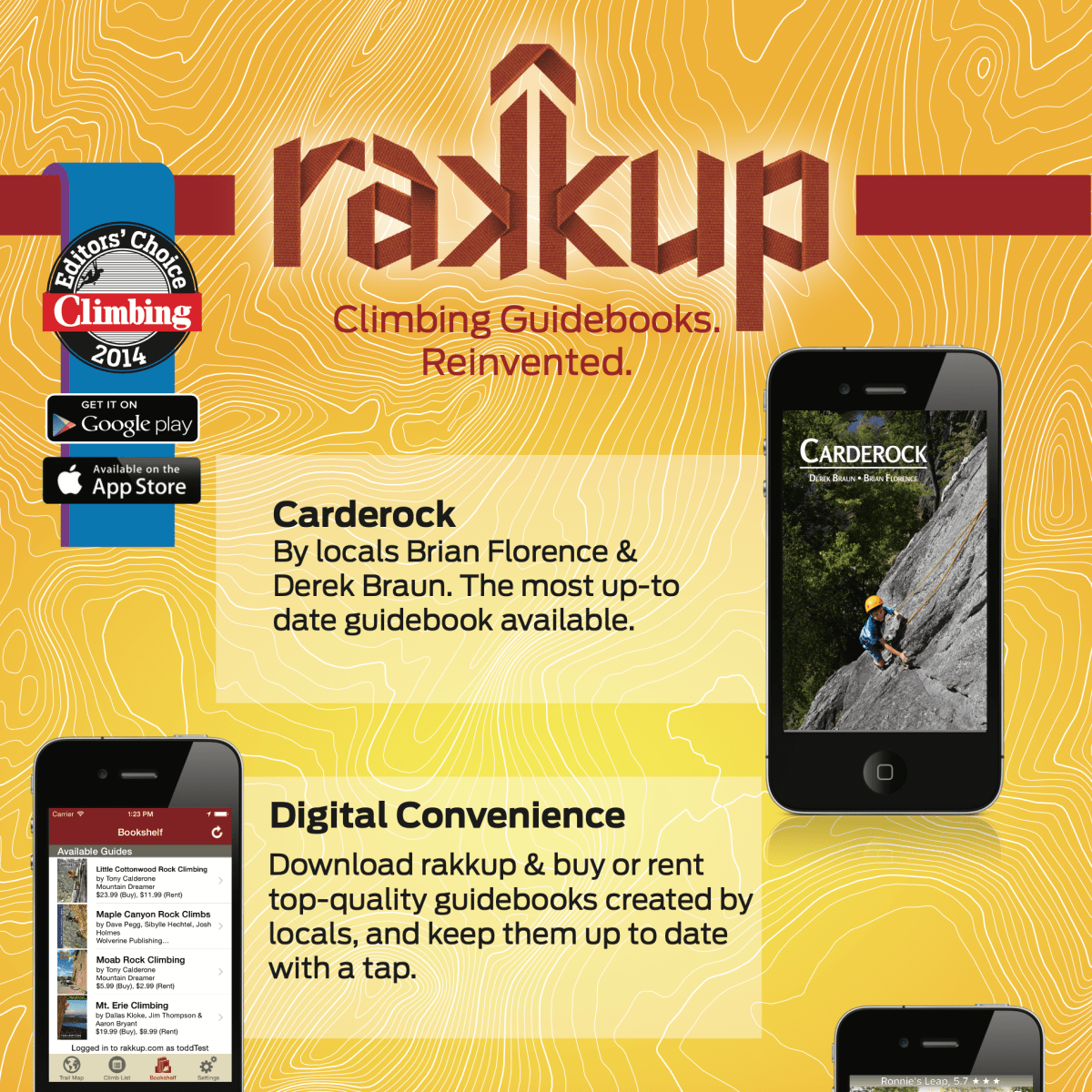
Our rakkup Carderock guidebook!

Brian Florence and I wrote a Carderock guidebook on rakkup as a labor of love. The rakkup app works on iPhones and Android. The app is free on the Google and Apple stores. Our guidebook is an in-app purchase.

Check it out!

I think rakkup has the right idea for the future. Nobody wants to throw a heavy guidebook into their crag pack, which is already full of important things. But, everyone keeps their cell phones on their body, no matter what.

And, because the rakkup app uses the phone’s GPS, it navigates to crags in a way that a print guidebook can’t.

Climb on!

Syntax highlighting for macOS applications

Code is a lot harder to read without syntax highlighting, and I needed highlighting for emails and presentations. So, I cobbled this solution from what I could find on the net. This macOS service allows me to select and highlight text in many macOS applications. It works for Pages, Keynote, and Apple’s Mail. It does not work, as written, in Microsoft Office, although you can still copy highlighted text from Pages to Word or PowerPoint, or perhaps modify this script to make it work in Office.

You will need two things to get this service working on your computer. First, download and install a command-line based syntax highlighter. Second, you need to set up an Automator workflow, to enable the service itself.

Install a command-line highlighting utility.

I use highlight. A strength of Pygments is that it can auto-detect languages, while highlight does not. But, Pygments often doesn’t guess the correct language if the highlighted code is short, because today’s popular languages use highly similar syntax.

I installed highlight using Homebrew:

$ brew install highlight

To install Pygments:

$ pip install pygments

Create your Automator workflow.

Open Applications > Automator. Choose “Service” as your new workflow type. Choose “Run Applescript” as your one and only action. Above this action, you will see some options. Set this workflow to receive text in any application. Do not check the box that says ‘Output replaces selected text’ because then this script won’t work.

Copy and paste this code.

In your run Applescript box, copy and paste:

on run {input, parameters}
    try
        set old to the clipboard as record
    end try

    do shell script "echo '" && input && "' | tr '\\r' '\\n' | /usr/local/bin/highlight --syntax=Python --out-format=rtf --style=edit-matlab --font=courier | pbcopy"

    tell application "System Events" to keystroke "v" using command down
    delay 0.5

    try
        set the clipboard to old
    end try
end run

Save this service.

I use the name “Python Syntax Highlighting” but you can call your service whatever you want. Whenever you select text in any application, your new Service will appear on the menu bar as [Application] > Services > Python Syntax Highlighting [or whatever name you saved it as]

This service works well for programs that support RTF. I use it all the time in Keynote, Pages, and Apple’s Mail. It does not work in Microsoft Office, though, although it may be possible to modify the script above to make it work in Office. Good luck!

Installing NumPy, SciPy, matplotlib, PyMC, and Basemap/geos on macOS 10.9 Mavericks, 10.10 Yosemite or 10.11 El Capitan

For my research, I use Python, NumPy, SciPy, matplotlib, PyMC, and Basemap/geos, among other modules. These tools used to break with each new version of macOS, although as it has matured, the disruptions with each new release have become less.

I’ve tested these instruction on macOS 10.8 Mountain Lion, 10.9 Mavericks, 10.10 Yosemite, and 10.11 El Capitan when they were reasonably current. Over the years this post has been edited and updated to keep up with new versions, and new Homebrew formulae have been added and improved. I haven’t been going back and re-testing these instructions on older macOS releases, so your mileage might vary if you do this.

Consider starting with a clean install of macOS.

The dirty upgrade works great if you’re an everyday user who stays on the UI level, but in the distant past it made a terrific mess of my tools installed under the hood. I’ve ended up with multiple MySQL servers and multiple Apache servers. But, as macOS and Homebrew have matured, I’m noticing less of a need to do this.

If you decide to do a clean installation, first make sure that you have a backup. Time Machine works spectacularly well for this purpose, or you can install onto a new hard drive or carbon copy your old drive. Erase your working hard drive, install macOS, then have Migration Assistant import user accounts and applications from the backup (but leave the Other Files & Folders box unchecked). Migration Assistant takes care of restoring ordinary documents, which Apple does well, yet it provides a relatively blank slate under the hood to freshly install tools.

If you decide that you don’t want to start with a clean install of macOS, then go through these instructions anyway. For each package, use $ brewupdate and $ brew upgrade to download new packages. Use my directions to keep you on track as you test each package after each reinstallation, as I have demonstrated in my instructions, so that if there are problems, you know where they are.

Download Xcode from the App store and install the command line tools.

Xcode is a dependency for Homebrew, which uses Xcode’s gcc compiler to compile everything from source. Once you have Xcode installed, you need to install the command line tools for the gcc compiler to work. The quickest way to do this is from Terminal:

$ xcode-select --install

Check the systemwide PATH variable.

Open a Terminal window, and type:

$ cat /etc/paths

Make sure that /usr/local/bin occurs before /usr/bin. If they don’t, then you need to change this order. Edit /etc/paths using vi or your favorite text editor. Close your Terminal window and open a new Terminal window for this change to take effect.

Obtain Homebrew. 

Homebrew is a great package manager for macOS that installs everything in /usr/local/bin and does not require sudo.It then creates symlinks to the expected locations so that the various tools can find one another. Because the packages are centralized in the Cellar, they are easily updated and/or removed.

$ ruby -e "$(curl -fsSL https://raw.githubusercontent.com/Homebrew/install/master/install)"

Fix any problems that Homebrew detects.

$ brew update
$ brew doctor

Follow $ brew doctor‘s instructions. brew doctor usually complains about Xcode. If I’m guessing the error correctly, here is the solution that brew doctor will suggest (assuming OS X 10.10 – note the version since this affects what you will type into Terminal):

$ cd /Applications/Xcode.app/Contents/Developer/Toolchains/
$ sudo ln -s XcodeDefault.xctoolchain OSX10.10.xctoolchain
# note the version (10.10) and modify accordingly.

Run $ brew doctor again. Continue to follow brew doctor‘s instructions until it tells you that “Your system is ready to brew.”

Install Homebrew’s gcc.

This step, overlooked in the other blogs I’ve seen, has been required in the past for successfully installing SciPy and PyMC (newer Homebrew formulae may have fixed this problem). Without this, installation has failed with a vague gfortran error.

$ brew install gcc

Install Homebrew’s Python.

$ brew install python

Update macOS’s Python symlink to point to Homebrew’s Python.

This symlink controls the version of Python that runs when a user types python in Terminal. These directions should have appeared at the end of your brew installation, but in case you missed them, here they are (These instructions assume Python 2.7.6 – note the version since this affects what you will type into Terminal):

$ cd /System/Library/Frameworks/Python.framework/Versions
$ sudo rm Current
$ ln -s /usr/local/Cellar/python/2.7.6/Frameworks/Python.framework/Versions/Current
# note the version (2.7.6) and modify accordingly.

Now, we will verify homebrew’s Python installation. If there’s a problem, we need to fix it now before proceeding with installations.

$ which python
# should see /usr/local/bin/python

Don’t touch or relink macOS’s system Python. Change your hashbang habits.

This is another place where this blog differs from other blogs.

MacOS exasperatingly contains yet another copy of Python, called system Python, located at /usr/bin/python. The standard hashbangs !#/usr/bin/python or !#/usr/bin/env python will call Homebrew’s Python when the script is run by the local user, but will call system Python if the script is called by a launchctl daemon/agent. Other blogs have recommended deleting system Python and symlinking the deleted file to homebrew’s Python installation, but this solution creates serious problems with macOS Server, which depends on the original system Python installation being left intact.

Therefore, just change your habits to always use this hashbang: #!/usr/local/bin/python and all of these problems go away, no matter where or by which user your script is executed. Easy-peasy.

Install NumPy, SciPy, and matplotlib.

First try each installation using homebrew. In the past, Homebrew didn’t yet have formulae for some of these, so I used pip whenever a formula was not available.

$ brew tap homebrew/python
$ brew install numpy
$ brew install scipy # this module used to require homebrew's gcc to succeed.
$ brew install matplotlib
# let's test our installations
$ python
>>> import numpy
>>> import scipy
>>> import matplotlib
>>> exit()

Install Basemap.

Basemap depends on geos, which needs to be installed first.

$ brew install geos

Download the latest non-Windows Basemap tarball. Unpackage it by double clicking on the compressed file on your desktop (which is easier) or use tar -xzf. Then, cd into the directory.

$ python setup.py install
$ cd examples
$ python simpletest.py
# this tests your installation

Install PyMC.

This module is for Markov chain Monte Carlo (MCMC) simulations. If you don’t use MCMC then you should skip this. PyMC won’t install without a successful SciPy installation, which, in turn, has depended upon Homebrew’s gcc compiler.

$ git clone https://github.com/pymc-devs/pymc.git
$ cd pymc
$ python setup.py build
$ python setup.py install
$ python # let's test our installation
>>> import pymc
# if you get a warning about statsmodels and/or patsy you can probably ignore it.
# I did, and my simulations have worked fine.
# (I hope!)
>>> exit()
$ rm -R pymc

You’re done! Happy programming!

I didn’t come up with all of this on my own. I acknowledge: